

Behind every great film or show is a post-production team that never stopped creating.
They collaborated freely, solved problems on the fly, and kept momentum alive – even when picture was unlocked, the deadline moved, or a new voice joined the edit suite at short notice.
That's the work. And the work doesn't stop.
But the tools around it sometimes do.
A new collaborator needs access. Someone has to track down the right person, make a request, wait for confirmation, follow up. By the time they're in, the conversation has moved on.
We built Workspaces in DeepEditor™ to close that gap.
What Workspaces does
Workspaces gives you a shared environment inside DeepEditor™ — one place where your team works together on the same projects, with access that you control.
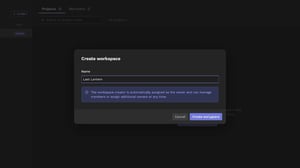
Create a workspace in seconds. Invite collaborators by email. If they don't have a DeepEditor™ account, they'll be set up automatically — no separate admin request, no waiting on us.
As workspace owner, you decide who's in and who isn't. You can add members, remove them, or hand ownership to someone else, entirely on your own schedule.
The result: fewer interruptions to the creative work. That's the point.
For larger teams and organisations
If you're managing multiple productions – or need oversight across teams and departments – Workspaces scales with you.
Enterprise accounts include an organisation-level admin panel: one place to see every workspace, manage users across the organisation, and ensure the right people have access to the right projects. Your org admin controls who joins the organisation; workspace owners handle day-to-day membership from there.
No more contacting Flawless every time someone new joins a project. Your team owns that process end to end.
Assistive AI, kept out of your way
DeepEditor™ is assistive AI tool built for post-production – it exists to give filmmakers more control over their work, not less. Workspaces is an extension of that philosophy.
The creative decisions belong to the people making the film. The AI removes obstacles. Access management shouldn't be one of them.
Try it now
Workspaces is live in DeepEditor™ today.
Log in to your account, open the workspace switcher, and create your first workspace. Invite your collaborators by email and get back to the work that matters.
→ Read the Knowledge Base guide: Organizations, Workspaces, and Roles in DeepEditor